

Your brand guidelines are immaculate — the culmination of many months of work. The PDF is a thing of beauty. Every colour is precisely specified, typography is locked down, logo usage is crystal clear. Your print collateral looks exactly how it should.
So why does your website feel… off? Why does that consistency you’re so proud of on paper start to unravel the moment pixels get involved?
Why do agencies, designers and developers keep delivering work that technically follows the brand but somehow doesn’t look like you thought it would? Why does everyone seem to interpret the guidelines differently? Why does the thing that looks stunning in your brochure fall apart on a screen? And why is your current website refresh stuck in iteration hell?
Here’s the underlying problem: most brand guidelines weren’t built for digital products. The gap between what works on paper and what works on screens is wider than you might realise.
The moment it falls apart
A typical scenario goes like this: You hand over your comprehensive brand guidelines at the start of your digital project. The team works on wireframes, gets the flow right, and then it’s time to apply the visual design. You wait in anticipation to see the high-fidelity mockups, but you’re underwhelmed. Something feels off. You start offering solutions, like “change this button to that color” or “put more of this brand element in,” but your designer pushes back, because design by committee rarely ends well and changes based on subjective preferences lead to a world of trouble.
Then your designer starts asking questions your guidelines can’t answer:
- “How would you like to manage accessibility constraints when overlaying text on images?”
- “What’s the accessible hex value for the primary blue?”
- “How should we adapt that pattern on mobile?”
- “How should buttons look when someone hovers over them?”
- “What happens when there’s an error message?”
- “Can you send me SVG files so we can animate those icons?”
- “How should we adapt your tone of voice so copy is scannable and suitable for web applications?”
- “If we use this vector/rastor combination, page speed will suffer, or the image won’t look sharp — what shall we do”?
Your comprehensive brand guide, beautiful as it is, goes silent. Because it was created for a different medium with different constraints, and these digital-specific questions weren’t in scope.
Inevitably the project gets stuck in a loop, as the designer tries to make sense of everyones vision of what they think looks good.
When a digital designer hesitates to follow your print-derived guidelines exactly, it’s not about being difficult. They’re balancing your brand with usability, accessibility, conversion rates, SEO, page speed, and buildability. These are essential constraints that every digital designer must navigate.
Your brand guidelines aren’t necessarily bad — they’re just created for a medium that doesn’t move, resize, or talk back.
Here’s what typically falls through the cracks:
Accessibility requirements and color contrast
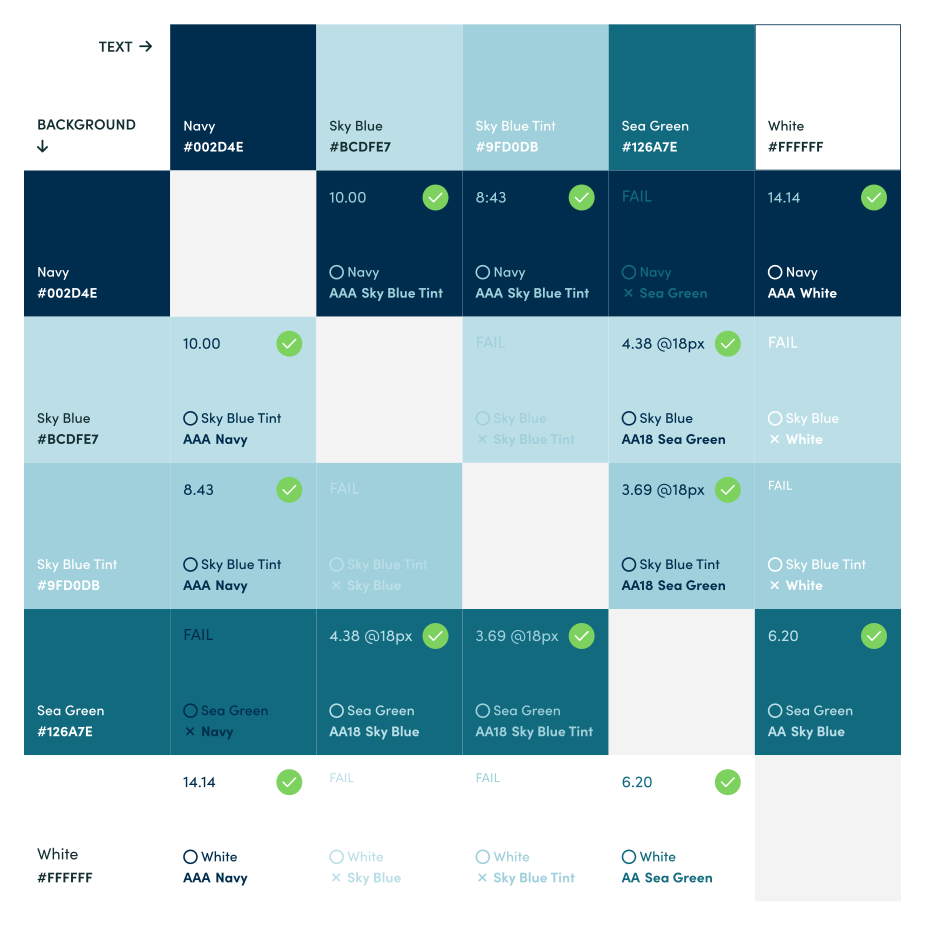
Print designers can use any colour combination that looks good. Digital designers need to meet (legally required) minimum accessibility standards. Print guidelines rarely specify contrast ratios. That gorgeous light grey text on white background? Probably fails WCAG minimum contrast standards. Your primary colour might be illegible on certain backgrounds, and your company is at risk of lawsuits if you don’t get this right.
Colour specifications and palette issues
Beyond accessibility, Pantone and CMYK values don’t work on screens — you need hex codes, RGB values, or HSL. Many brand guides don’t provide these, leading to inconsistent translations across projects.
Additionally, pre-defined shades and tones are rarely offered. A palette with eight colors might work beautifully for print collateral, but it causes decision paralysis and visual overwhelm in digital interfaces. Primary brand colors, when overused in digital applications, create stress and cognitive overload for users.
Focus states
When someone navigates your website with a keyboard (essential for accessibility), they need visual indicators showing where they are. Focus states also support your regular users — as do most accessibility requirements.
Font choices and typography scaling
There are seemingly endless options when it comes to font selection, yet I’m often handed combinations that look great on a billboard but fail on a mobile phone.
Print can go smaller because reading distance is controlled. Online, text below 16px becomes difficult to read, especially on mobile. Many print-derived guidelines specify font sizes or combinations that fail basic readability tests.
A heading that’s perfect on A4 might dominate a phone screen or disappear on a large display. Print gives you one size; digital needs a system that scales.
Font licensing and technical requirements
That font family that’s perfect for print might not have a web license, it might be too large to load quickly online, or too decorative to read on small devices. Print guidelines rarely address web font performance, fallback stacks, or the technical specifications developers need to implement typography correctly.
Brand graphics and assets
Icons often have inconsistent line weights and aspect ratios, or we’re supplied with heavy patterns that tank page performance and overwhelm the user. Neither belong in a digital system.
Print uses high-resolution images and vector files. Digital needs multiple formats at different sizes, optimized for performance and legibility. One print guideline becomes dozens of required image variations — SVG for icons, WebP for photos, multiple sizes for responsive images.
Brand graphics that look like buttons or clickable elements when viewed on a screen create usability disasters. Users click on decorative elements expecting something to happen, leading to confusion and frustration.
Responsive considerations, fixed layouts and breakpoints
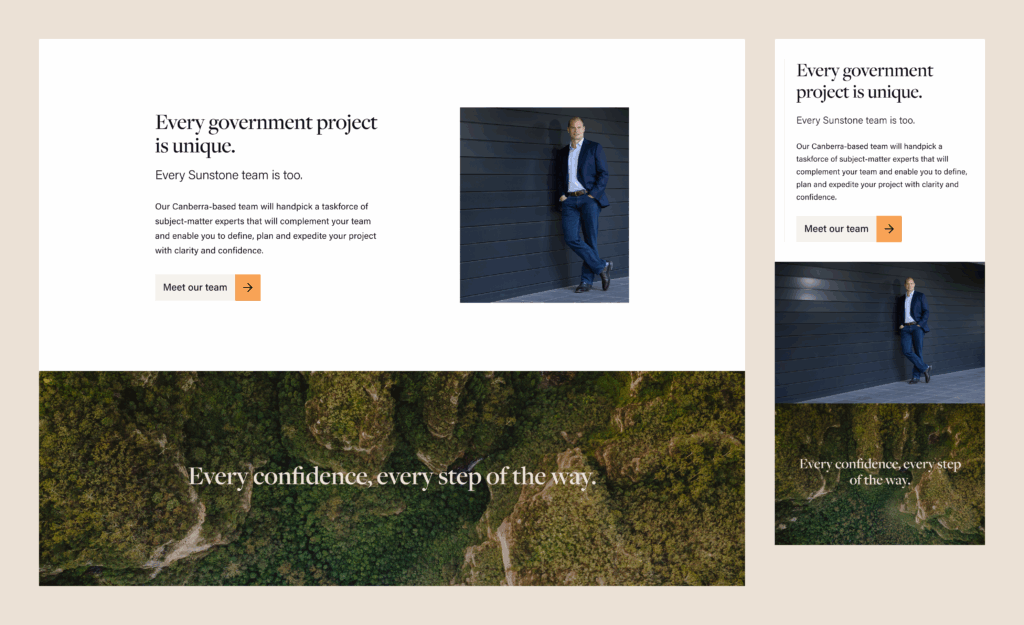
Print exists at a fixed size. Digital needs to flex and adapt across phones, tablets, laptops, and giant monitors. Online, layouts must reflow for different screens. Which elements stack? Which hide? What happens when content changes? How can your intricate graphic contribute to the website’s goals when its minimum recommended size is bigger than your average phone screen? At what width does your layout shift? These decisions affect visual consistency but print guidelines rarely address them.
Interactive states
Print is static; digital products are interactive. Every clickable element needs multiple states that print guidelines rarely consider. Your print guidelines might show one beautiful button. Digital needs eight versions of that button, all feeling cohesively branded:
- Default: How it looks at rest (usually the only state print guidelines show)
- Hover: What happens when someone moves their mouse over it
- Active/pressed: The moment someone clicks or taps
- Focus: When navigating with a keyboard
- Disabled: When an action isn’t available
- Loading: When waiting for a response
- Error: When something goes wrong
- Success: When an action completes successfully
Touch targets
Digital products need tappable areas of at least 44×44 pixels. Your print specifications might look elegant but be unusable on a phone.
Component specifications
A print guideline might show a finished design with perfect visual polish. But developers need measurements, spacing values, layer properties, and behavioral rules to build it. “Make it look like this” isn’t a buildable specification — they need precise technical documentation.

Cognitive load and hierarchy
What works in print doesn’t always work on screen. The way people interact with digital differs fundamentally.
When a designer applies your brand to wireframes, they’re doing more than making it look good. They’re working within constraints, constantly balancing the brand with user needs, business goals, accessibility, page speed, search optimization and more.
Scanning vs. reading
Print design can be more decorative because people commit to reading physical materials. Online, users scan first. Visual hierarchy needs to be more pronounced, white space more generous, and decoration more restrained.
Attention spans
A poster can hold someone’s attention for 30 seconds. A website has about 3 seconds to communicate value. Design needs to work at scanning speed and is often secondary to the written content. A good digital design helps the user focus on the right things.
Progressive disclosure
Print can show everything at once. Digital often needs to hide complexity behind clicks, tabs, or accordions. How does your brand express itself in these interactive patterns? How do we remain on-brand but ensure we get out of the way of whatever it is the user is trying to do?
Animation and motion
Again, print is static. Digital can use motion to guide attention, indicate relationships, and provide feedback. But too much motion (or the wrong kind) causes accessibility issues, usability problems and distraction. Print guidelines have no opinion on this.
The real-world impact
These aren’t just theoretical concerns. Here’s what actually happens when the gap between print guidelines and digital design systems isn’t addressed:
You’re forced to choose between following your brand guidelines and meeting minimum accessibility standards while still supporting your users and business goals.
Do you want a site that converts and sells or a pixel-perfect digital brochure that doesn’t?
It’s an impossible decision, and one that leaves your designer trying to achieve the impossible or trying to define your brand on the fly. If it gets to this stage, the project should be put on hold while the brand is defined for digital.
Without this stop, the outcome is a mess. You might experience:
- Three shades of the same color appearing across your digital products, because everyone translated your Pantone differently.
- Buttons that look like links (or vice versa) because interactive state guidance doesn’t exist, resulting in dead clicks and frustrated users.
- Illegible text on colored backgrounds that looked fine in print but fails contrast checks online.
- Navigation that works on desktop but becomes unusable on mobile.
- Inconsistent spacing and sizing because everyone’s guessing – a poor design that erodes user trust.
- Accessibility barriers that expose you to legal risk.
- Agency work that’s “on brand” but somehow feels different every time.
- Endless back and forth as marketers and CEO’s offer their subjective opinion on how the designer should fix the problem.
- Delayed launches or scope creep as teams struggle to reconcile conflicting requirements.
How to make your brand guidelines fit for digital
The most effective approach is to have a digital designer (with branding acumen) work with your graphic designer during the development of your visual identity.
But if that ship has sailed, there’s good news: you don’t need to throw away your brand guidelines. You simply need to extend them for digital contexts.
Your foundations stay the same, maybe with a few refinements to ensure a cohesive solution, but you add a layer that allows your brand to work effectively cross-platform.
Start with an audit
Review your current guidelines against these questions:
Color & Accessibility
- Are colors specified in web-friendly formats (hex, RGB)?
- Do color combinations meet WCAG AA contrast requirements (4.5:1 for normal text, 3:1 for large text)?
- Are there shades and tones of your brand colors?
- Are there recommendations on which colors to use if your brand has too many for to support digital design principles?
Typography
- Are font sizes and line heights appropriate for screen reading?
- Do you have web font licenses?
- Are fallback font stacks specified?
- Are fonts still legible when on smaller screens?
Layout & Responsiveness
- Is there a system for responsive spacing and layout?
- Are breakpoints and stacking behaviors defined?
Interaction & Accessibility
- Are colors meeting the minimum contrast requirements?
- Do you have guidance for interactive states?
- Have you addressed keyboard navigation and focus states?
- Is there guidance on animation and motion?
Implementation
- Are there specifications developers can actually build from?
- Are assets provided in web-optimized formats?
Where you find gaps, you’ve found work to do.
Typical additions for digital brand adaptation
If you find yourself in this situation, resist the urge to hand your brand guidelines back to your original designer. If these things weren’t included, then it’s likely that digital brand adaptation isn’t their wheelhouse. Collaboration is key, and they should absolutely be in the conversation. If they were involved in the brand strategy, they will have insights that your digital designer isn’t party to and can really support the process.
Elements that a digital brand adaption might address include:
Colour tokens
Add web-ready values, contrast-safe combinations, semantic roles (primary, secondary, error, success, warning), and accessible shades and tones.
Type scale
Define a responsive hierarchy with readable line heights and weights optimized for screens.
Spacing system
Use a consistent scale for margins, padding, and layout gaps that works responsively.
Component library
Document your core UI patterns — buttons, forms, navigation, cards — with all their states and responsive behavior.
Accessibility standards
Set clear minimum contrast ratios, focus styles, and semantic requirements.
Motion principles
Define when and how to use animation, and crucially, when not to.
Images and assets
Ensure your guidelines consider user attention, file formats, file sizes, and performance optimization.
When to update and when to start again
If your brand guidelines are relatively new and well-structured, add a Digital Applications section or companion document.
If they’re older or heavily print-focused, create a separate digital design system. Reference the core brand guidelines for foundations, but document digital specifics independently.
Either way, make the relationship clear so teams know where to look for what.
The business case for digital brand adaptation
This isn’t just about design perfectionism. Extending your brand guidelines for digital has tangible business benefits:
- Faster delivery: Agencies and internal teams spend less time guessing and more time building.
- Reduced revisions: Clear specifications mean fewer rounds of “that’s not quite right.”
- Consistent branding: Every touchpoint reinforces the same brand, building recognition and trust.
- Better accessibility: Meeting WCAG standards reduces legal risk and expands your addressable audience.
- Easier scaling: New products or features launch faster when patterns are documented and reusable.
- Lower costs long-term: Upfront investment in documentation saves money on every subsequent project.
- Happier teams: Designers and developers aren’t constantly debating decisions or reinventing patterns.
Getting started without getting overwhelmed
You don’t need to solve everything at once. Start small and practical:
- Pick one touchpoint: Usually your main website or primary digital product.
- Document one pattern properly: Take something you use everywhere (like buttons) and specify it completely for digital — all states, responsive behavior, accessibility requirements, code specifications.
- Use it on a real project: Test whether your documentation actually helps teams work faster and more consistently.
- Extend gradually: Add more patterns as you need them, building your digital design system alongside real work rather than as a theoretical exercise.
- Review quarterly: As your products evolve, update your digital guidelines to reflect what’s working and remove what isn’t.
For a comprehensive framework on building and maintaining digital design systems, see our guide to design systems without the faff.
Key takeaways
Your print brand guidelines aren’t wrong. They’re just incomplete for digital contexts. The visual identity you’ve invested in is valuable — it just needs extending to get the full benefit.
Digital products are interactive, responsive, accessible, and multi-contextual in ways print never has to be. Your brand guidelines should acknowledge those realities.
The gap between print and digital is where inconsistency lives, where accessibility fails, and where your brand promise weakens. Closing that gap isn’t a nice-to-have — it’s essential if you want your brand to show up consistently in the places people actually see it.
Start with what you have. Extend it for digital realities. Document decisions as you go. Your brand deserves to work as beautifully online as it does in print.
Talk to Sarah Jee about Digital Brand Adaptation
Book a free chat. Let’s see what you’re working with and how I might be able to help.
A note to brand designers with a print background
If you’re reading this, thank you. This article isn’t about pointing the finger at brand designers who hail from a print background. I don’t have the first clue about printing presses or paper stocks or Pantone matching, and I do appreciate that this is a lot to learn if you started out in print. The reality is, for now at least, digital is just as important to our clients as print is, and our industry needs to do better at closing the gap. If you find yourself wanting to understand more let’s talk.